
nana
Windows-native multi-agent terminal where agents run in parallel using dedicated git worktrees and persist in the background.
Screenshots
At a Glance & Reviews
Community Discussions (1)
- Nana: A modern C++ GUI library 2019-04-20 · 108 pts
About nana
nana is a native terminal multiplexer designed for parallel collaboration among multiple coding agents, running on Windows. It was developed by Gustavo Ramirez under the name Areshk. His personal site introduces him as working in backend and cloud integration in his day job and developing native applications in his spare time; nana is his personal project, released on Product Hunt on November 3, 2026. It solves the problems of scattered windows, tasks interfering with each other, and not knowing who is waiting for a reply when multiple coding agents are open at the same time: it brings agents already in use, such as Claude Code, Codex, and OpenCode, into one terminal for unified scheduling, with each agent working exclusively on its own branch, and tasks continuing even after the window is closed. The official website is mainly a single-page introduction, and the feature scope below all comes from the official website and official release pages.
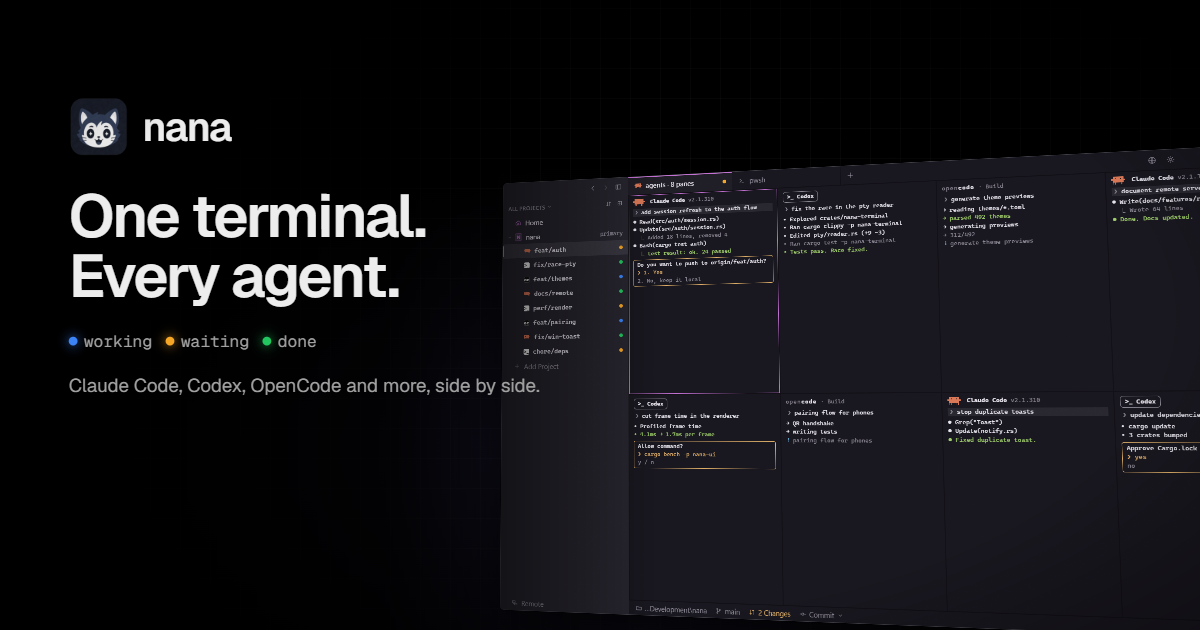
nana is built with Rust, GPUI, and libghostty, and is a native application with GPU rendering rather than an Electron wrapper, with its terminal engine from Ghostty. It assigns each agent an independent Git worktree and branch, so multiple agents modifying code at the same time do not overwrite each other, and switching, merging, and cleaning up branches are all done in the sidebar. State awareness requires neither hooks nor additional configuration: nana can identify the agents running in the terminal and show whether each is working, waiting, or completed. Examples given on the official website include Claude Code waiting for confirmation on whether to push, Codex completed with tests passing, and OpenCode executing with progress shown; the official release page says it can identify twelve agents, including Claude Code, Codex, OpenCode, Copilot, Cursor, Droid, and others, and sends a Windows notification when an agent is waiting for attention.
Code review is completed directly in nana: you can view Git diffs, browse earlier commits, and look back at previous changes without leaving the terminal for another tool. Sessions are carried by the nana-server running in the background, and terminals and agents continue running after the window is closed; when opening a project on Linux or macOS via SSH, nana installs nana-server on the remote machine, and the remote terminal keeps running after disconnection. There is a dedicated Composer for writing prompts, where long prompts with files and images can be composed and sent to a single terminal or to all panes at once. In terms of appearance, it has over four hundred and ninety built-in terminal themes with live preview support, including common color schemes listed on the official website such as Tokyo Night, Gruvbox Dark, Nord, Dracula, Solarized Dark, and Catppuccin Mocha; the extension mechanism is based on WebView2, and tabs, panels, commands, and status bar items can be added using the Web technology stack.
Getting started is a free beta, suitable for Windows 10 and above and requiring no administrator privileges, with the official release page providing a one-line PowerShell installation command. After installation, open a project, create new terminals for different tasks and assign worktrees, start the agents already in use, and then monitor status, review, and merge from the sidebar. On the mobile side, the official website marks iOS and Android apps as coming soon, planning to connect directly to the user's own server, without going through the cloud and without requiring an account, and they are not yet available.
It suits Windows developers who drive multiple coding agents at the same time on a daily basis, especially those with so many tasks that they need to be advanced in parallel and who are frustrated by frequently switching windows to check progress. Typical scenarios include having three agents work on authentication, fixing a race condition, and changing a theme on three separate branches, closing the interface overnight to let long tasks continue running, and running agents on a remote Linux build machine via SSH while keeping only one unified entry point locally. In terms of pricing, nana is currently free and in the beta stage, and neither the official website nor the release pages have announced future pricing arrangements. Its limitations are also clear: the current native client is only for Windows, Linux and macOS can only serve as remote project endpoints connected via SSH, mobile apps have not yet been released, and users who need to check agent progress on their phones still need to wait.
Compared with an ordinary terminal with tabs, nana's difference is that it organizes work by agent rather than by window, with worktree isolation, state awareness, background sessions, and in-app code review all designed around the single purpose of multiple agents working in parallel; compared with cross-platform general-purpose terminals, it currently bets only on the Windows native experience, gaining a lighter native implementation and targeting of the Windows workflow, but also meaning that non-Windows desktop users cannot use it for now.
Frequently Asked Questions
Is nana free?
Yes. nana is free to use. Check the official site for current plans and limits.